
Confidential Information Memorandum Review: Use Case Using AI
May 21, 2026
Why CIM Summarization Matters in Sell-Side M&A
The confidential information memorandum (CIM) is the key document in a deal that potential buyers use to assess whether to submit a non-binding indication of interest. Therefore, the way an analyst can summarize and package this information can materially affect the quality of the sell-side process. For a fuller breakdown of what goes into a CIM, see our guide to the Confidential Information Memorandum.
Is it Safe to upload a CIM to Claude AI?
Firstly, CIMs are confidential documents and are not intended to be publicly circulated. Before uploading onto any third-party systems, analysts must check and follow their firm’s AI usage policy. Important note: do not upload confidential, client-identifiable, or regulated information into any AI platform unless it has been approved by your organization, and appropriate security and data-governance controls are in place.
Why Use AI to Summarize a CIM?
AI tools such as Claude are particularly effective for CIM summarization for three main reasons:
- Can be done in a single pass: a typical CIM runs 50 to 200 pages and includes the business overview, financial performance, growth strategy, management team, market positioning, and risk factors. The 200,000-token context window is large enough to hold an entire CIM in a single pass, so the analyst does not need to chunk the document.
- Can build in multi-step instructions: structured extraction with multi-step reasoning allows Claude to pull investment highlights, financial figures, and risk factors into organized sections.
- Quick and easy to refine: iteration in markdown artifacts is fast, so the analyst can refine the draft in real time before committing a Word doc deliverable.
How to Summarize a CIM and Draft a Teaser with Claude AI
Summarizing a Confidential Information Memorandum (CIM) and drafting a teaser typically takes 2–3 hours of manual work, but with AI used correctly, the full workflow can take under ten minutes. It relies on using three Claude features in sequence: file upload, markdown artifacts, and the DOCX skill to create the final deliverable.
The CIM Summary Scenario
This is an M&A Advisory scenario that we will work through now: you are an analyst working on a sell-side process and you have received the latest CIM draft late in the day. The VP on your team wants an investment highlights memo by morning, and the team needs an anonymized teaser document ready to send to potential acquirers.
Both deliverables come from the same source document, but they serve very different audiences. Using AI can speed up this process, and when done properly can achieve a high-quality output.
To do this, the full workflow has four steps:
- Upload the CIM as a PDF directly into the Claude chat window
- Prompt Claude with a structured request for a markdown artifact summary
- Iterate on the draft in the side panel until the memo is locked
- Produce the teaser as an anonymized Word document with a follow-up prompt
Each step uses a different Claude feature, and the whole process should take under ten minutes once practised. The sections below walk through each step with guidance on the exact prompts to use.
1. Upload the CIM to Claude
To follow this process, download the CIM file from the free resources section of this blog. The ‘Project Cascade’ CIM download file has been created for training purposes, and all the information in the file is hypothetical.
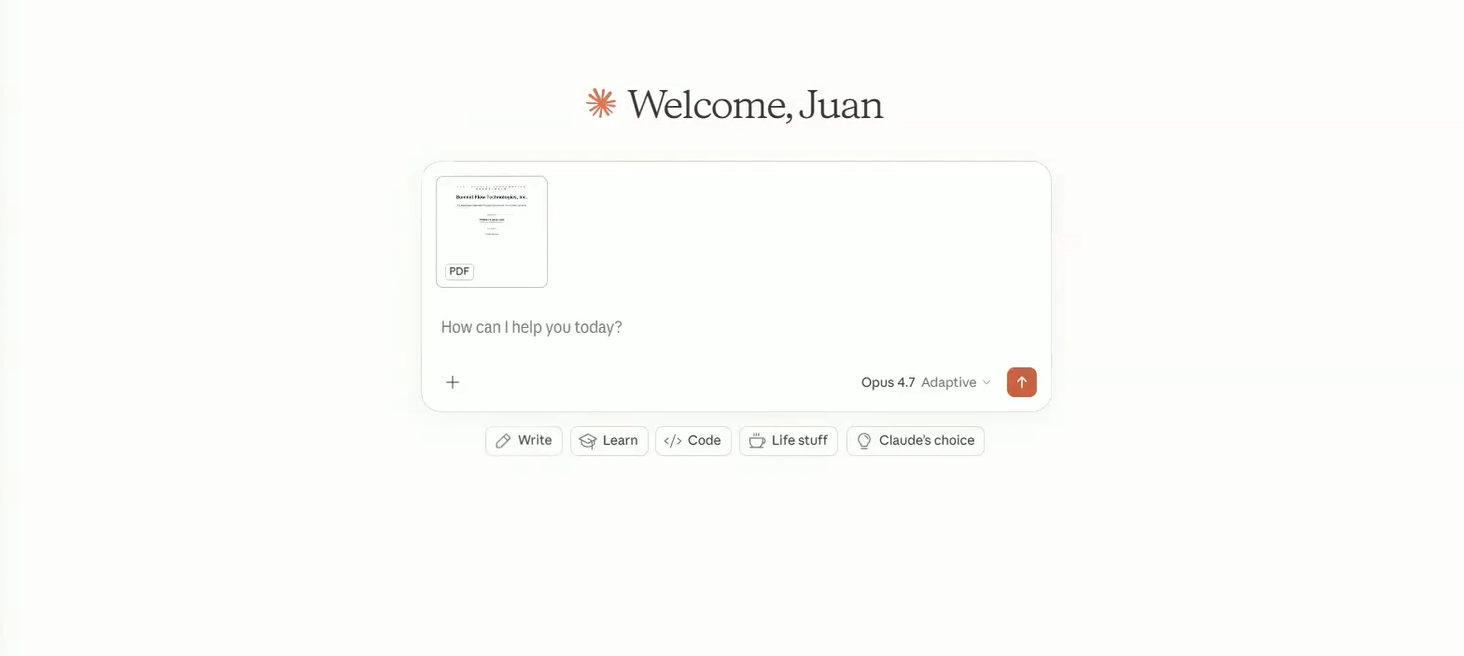
Once in Claude, drag the CIM PDF directly into the chat window (or use the plus ‘+’ button to upload if you prefer). Claude will read the entire document in a single pass, which means there is no need to chunk it, summarize it section-by-section, or pre-process the file. This is a major advantage of using Claude versus other AI tools. The full document will be available to Claude for the rest of the conversation.
2. Prompt Claude
The next step is to prompt Claude with a structured request.
To best facilitate Clause, a typical CIM-summary prompt opens with the persona, such as: “You are an investment banking analyst on a sell-side M&A engagement”. It then defines the task such as “create a structured summary”, and lists the required sections, e.g., company overview, financial highlights, investment highlights, risk factors, and deal considerations. The prompt will conclude as it specifies the output format, in this case, a markdown artifact in the side panel. An example prompt is shown below.
Example Prompt
‘You are an investment banking analyst working on a sell-side M&A engagement. Review the attached CIM and pull together a structured working summary covering:
(1) Company overview — business description, founding date, headquarters, and key operating segments
(2) Key financial highlights — revenue, EBITDA, margins, and growth rates with specific figures cited from the document
(3) Investment highlights — the top 5-7 selling points that would attract a potential acquirer
(4) Key risk factors — material risks disclosed or implied in the document
(5) Notable deal considerations — anything a buyer should flag for further diligence
Produce this as a markdown artifact in the side panel — a working draft I can iterate on, not a final deliverable. Use clear section headers and cite page numbers from the source where possible.’
Instructor Tip: Stick to the Correct Prompt Component. Well-written prompts can be reused and refined for other similar tasks. Always stick to the four components of a prompt to ensure success.
Useful AI Banking Prompt = Persona + Task + Structure + Output Format
Specificity is very useful when working with AI tools and can help deliver a strong output.
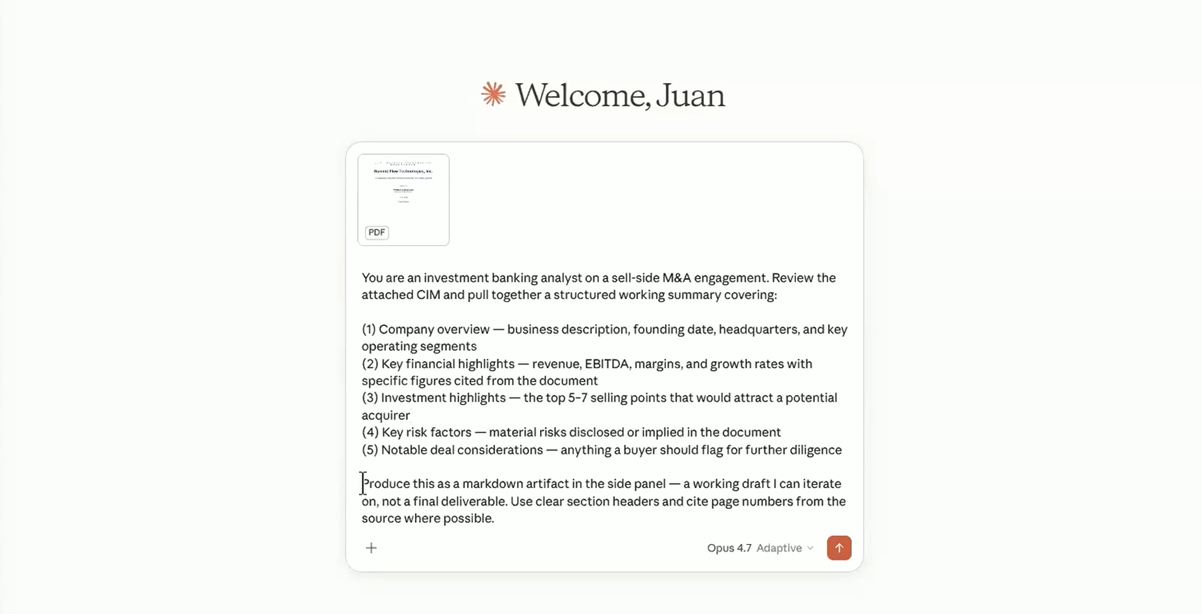
Once all the steps have been written, this can be entered into Claude.
The reason to request a markdown artifact rather than a Word document at this stage is speed. Markdown generates a near-instant output because Claude does not need to encode formatting (it is effectively an internal text file within Claude). Word documents are appropriate for final deliverables but can be best avoided for working drafts.
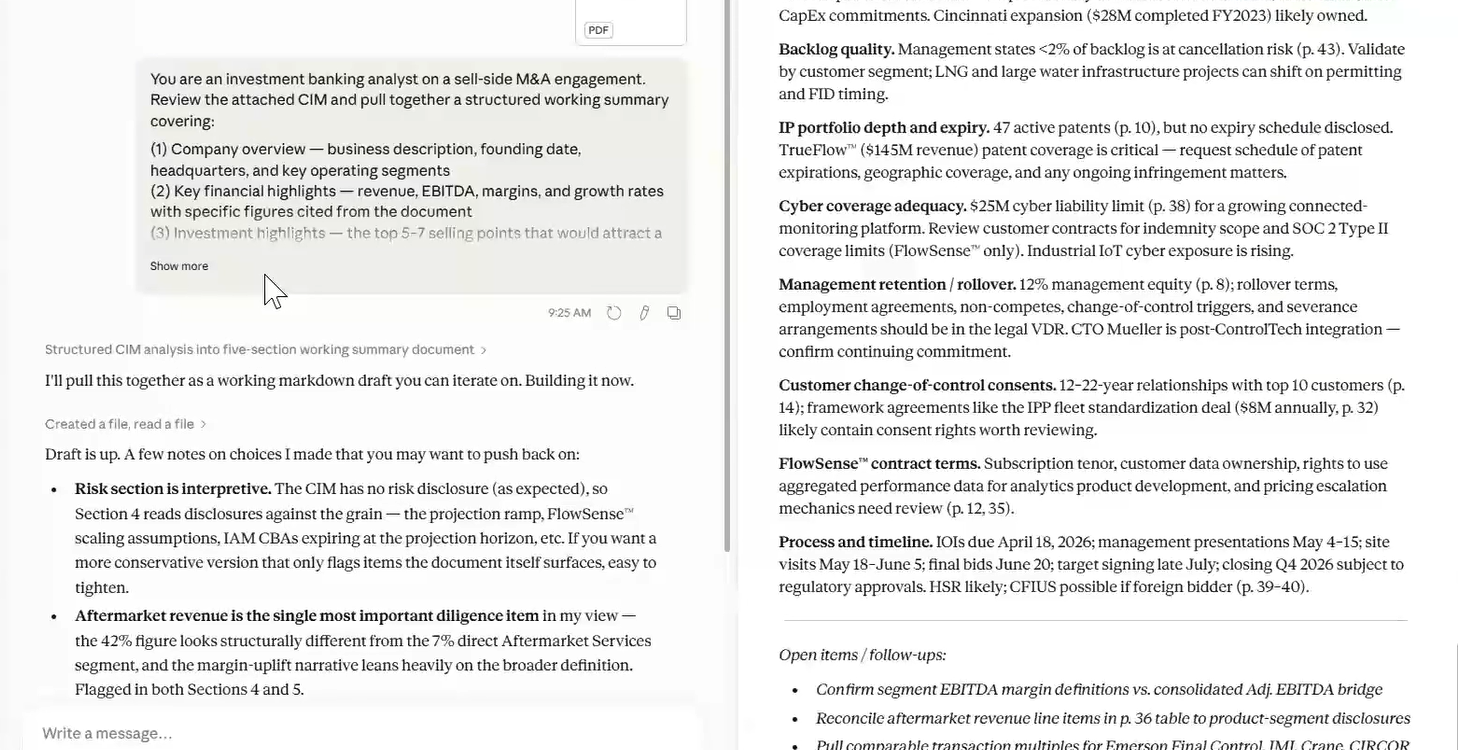
Claude shares reasoning steps (drafting the summary, adding page citations) in the main chat with the artifact building in the side panel. Then the file is created.
3. Iterate on the Draft
Claude will build the memo as a live artifact in the side panel. The finished CIM summary artifact in this example shows the company overview, financial highlights, investment highlights, risk factors, and deal considerations sections.
Common refinements to this action include adding a one-line investment thesis at the top, tiering the investment highlights, so the points most credible to a buyer appear first. Also, it can be helpful to remove material that is too speculative for an internal memo.
Each refinement prompts updates to the artifact in place. There is no need to start a new chat or regenerate from scratch. In this example, we can refine the CIM memo artifact with investment thesis added and tiered investment highlights.
Example Prompt:
‘Add a one-line investment thesis at the very top of the summary, capturing the core acquisition rationale. Then in Section 3 (Investment Highlights), restructure so the top two or three highlights lead — make clear which are most credible to a buyer rather than listing all of them equally.’
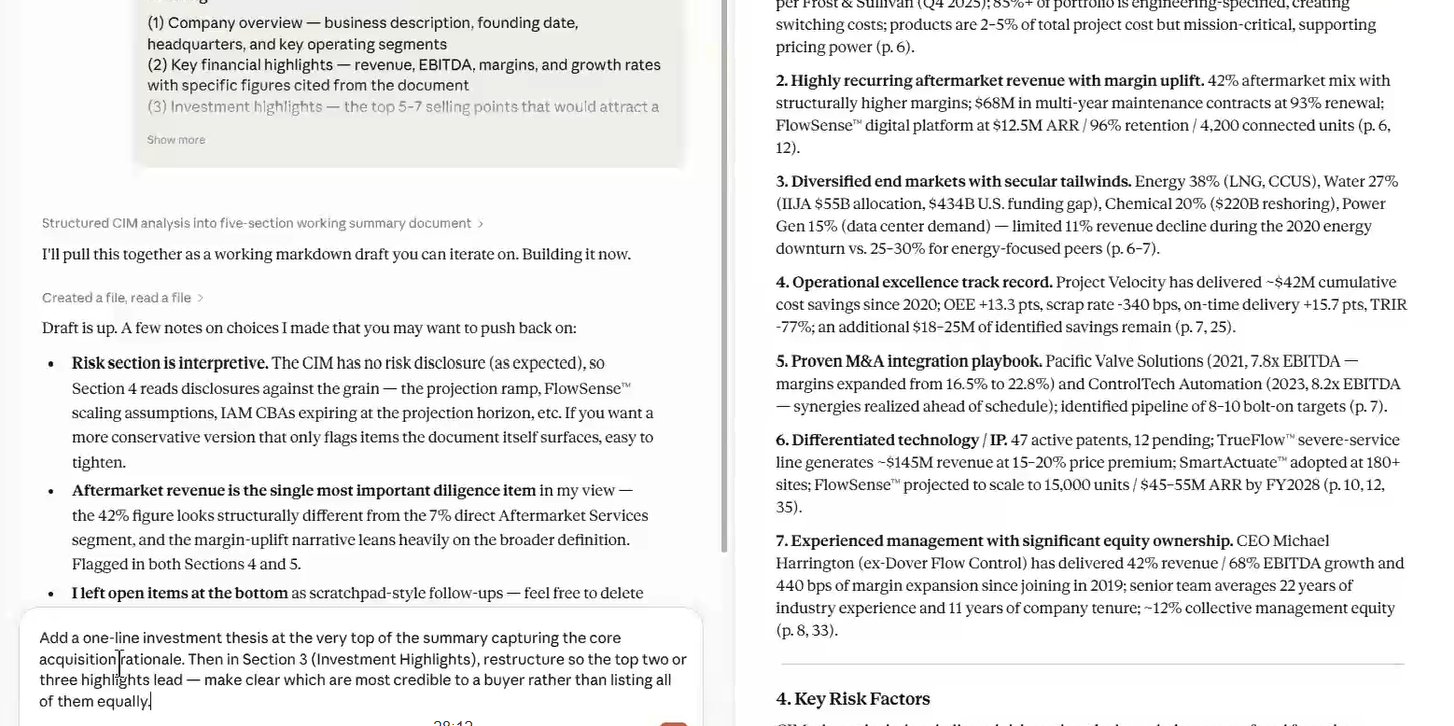
Adding refinements to the prompt should give immediate results in Claude. Remember that you can’t change or alter the text within the artefact, so using prompts is the best way to refine the output.
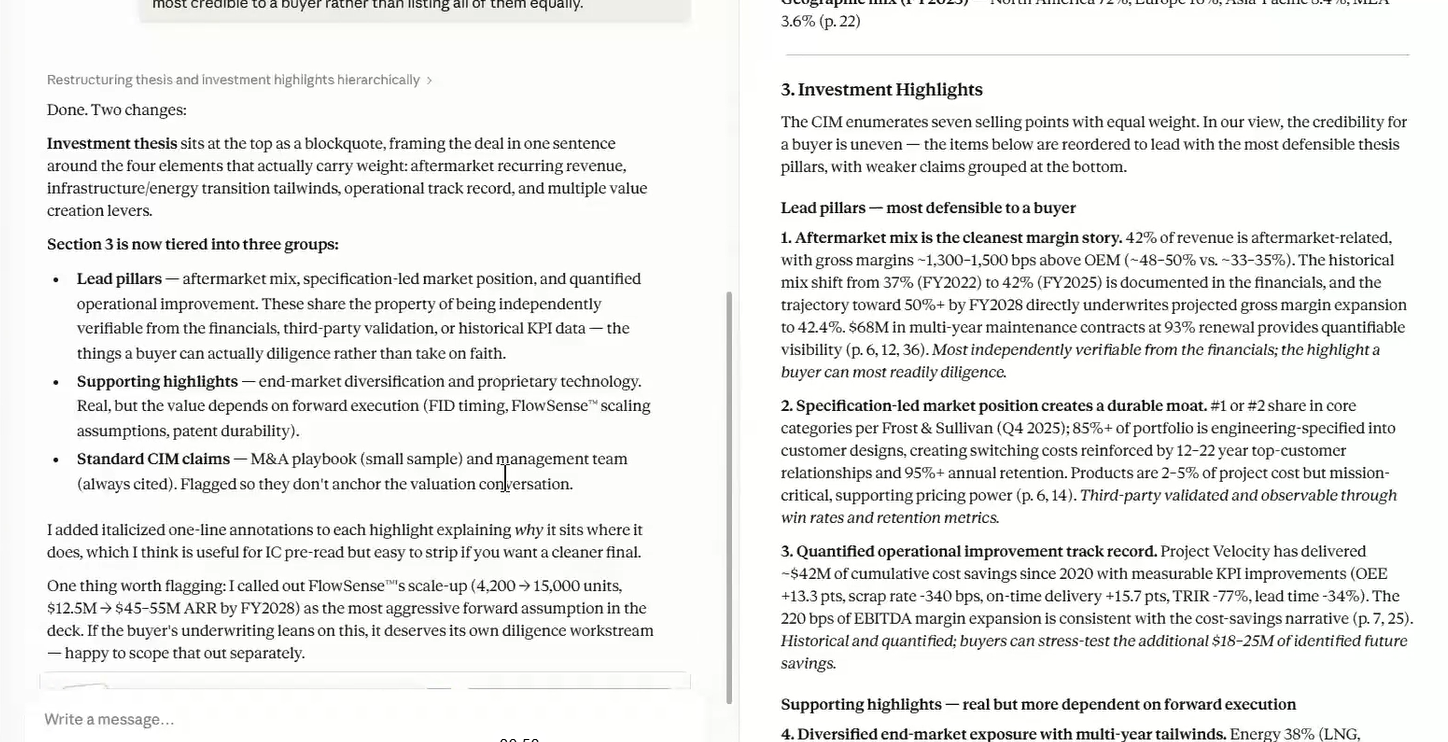
The image above shows that the prompt has created an ‘Investment thesis’ on the left-hand side, and on the right, we can see that the investment highlights have been amended.
4. Produce the Teaser
Once the memo is locked, use a follow-up prompt to ask Claude to extract the investment highlights, rewrite them as five concise bullets, remove all company-identifying details, and produce the output as a Word document. This will serve as a teaser document.
Example Prompt:
‘Take the investment highlights section from this memo and rewrite it as 5 concise bullet points suitable for a one-page anonymous teaser document aimed at potential strategic and financial acquirers. Emphasize growth trajectory, margin profile, market position, and scalability. Remove any company-identifying details. Keep each bullet to two sentences maximum.
Produce this as a formatted Word document (.docx) ready for distribution. Use a clean one-page layout with a title, a brief framing paragraph, the five bullets, and a next-steps footer.’
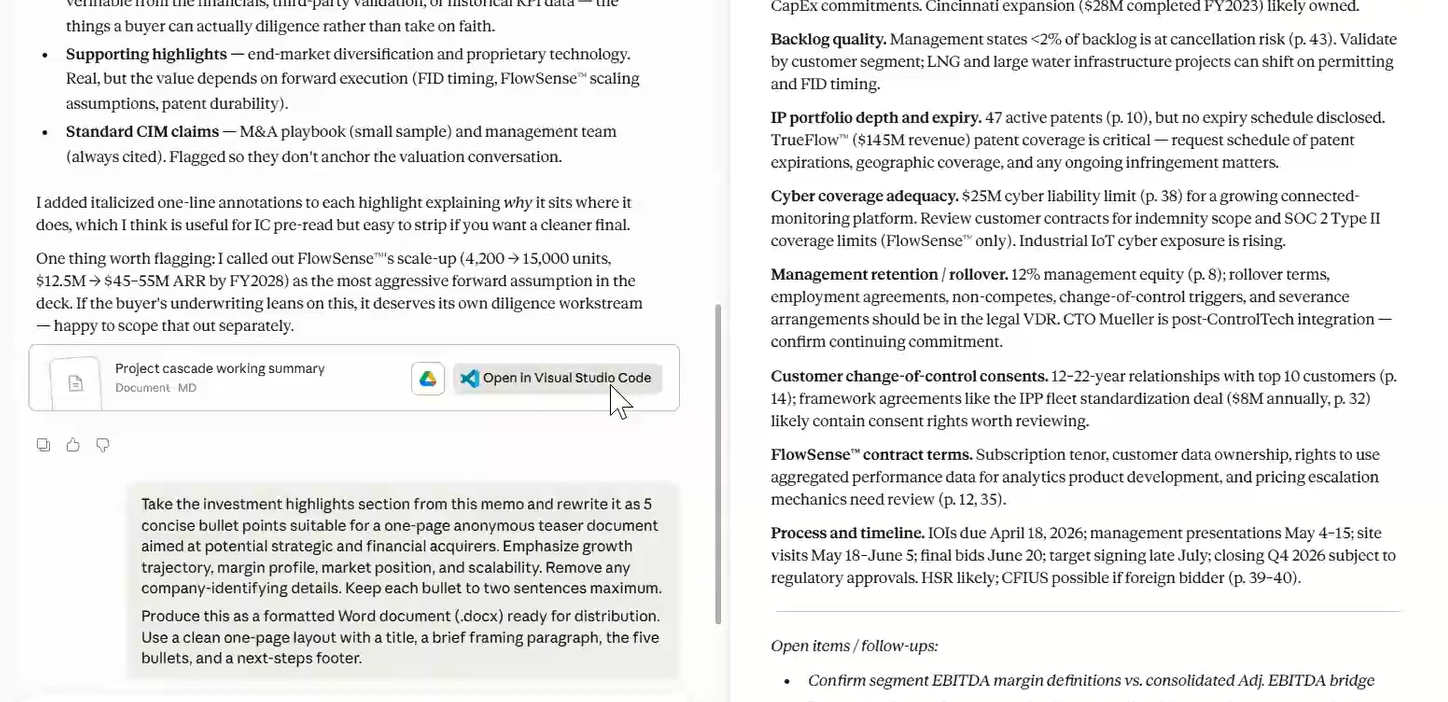
Always remember to state a desired length of document as it may vary from task to task. Claude automatically invokes its DOCX skill, which handles Word file generation. The final deliverable should arrive as a downloadable .docx file ready for distribution to potential acquirers. Note that by addition a line of formatting instructions to the prompt should save on editing time later on.
Instructor Tip: Always Verify Your AI Outputs
The single biggest habit that separates productive Claude users from frustrated ones is verification. Claude will give you a clean, confident-sounding summary every time, and the temptation is to trust it. Please don’t do this! Every number that appears in the output needs to be checked against the source CIM before anything leaves your desk. Claude does 80% of the mechanical work. The remaining 20%, the verification and the judgment, is what makes the work yours. Hand-checked documents are a lot more value-added than those auto-generated by AI.
Summary
Becoming proficient in using AI for financial documents is fast becoming a non-negotiable skill in the investment community. Careful attention to detail and creating robust prompts can quickly distinguish capable analysts from those who are still learning how to use AI in the workplace. Always be aware of your firm’s parameters for AI usage – it is a tool for analysts to use rather than a replacement analyst’s manual work and careful checks!
Frequently Asked Questions
How long does it take to summarize a CIM with Claude AI?
The full workflow, from upload to final teaser, typically takes under 10 minutes when done correctly. Manual CIM summarization typically takes 2-3 hours.
What is the best prompt structure for summarizing a CIM?
A useful CIM-summary prompt has four parts: persona (“You are an investment banking analyst…”), task (the specific summary requested), structure (the sections required), and output format (markdown artifact for drafts, Word for final deliverables).
What’s the difference between an ‘investment highlights memo’ and a ‘teaser’?
An investment highlights memo is an internal document for the deal team that captures the full investment thesis. A teaser is an anonymized one-page document sent to potential acquirers to gauge interest before any disclosure of the target identity.
Master the Full AI Stack for Investment Banking
This walkthrough covers just one workflow inside one tool. The AI for Finance: IB Analyst Training Series covers seven tools across the entire analyst workflow. This is taught by former bankers from Goldman Sachs, J.P. Morgan, and Merrill Lynch.
What students will get across the 7 weekly live sessions:
- Endex: AI-powered financial modeling in Excel (including three-statement models, LBOs, DCFs)
- Shortcut: an AI agent for comps tables, sensitivity analyses, and PDF data extraction
- Claude: for due diligence, covering CIM summaries, credit agreements, management Q&A
- Rogo: for real-time deal research, company profiling, precedent transactions
- Claude: for pitch book creation and PowerPoint integration
- ChatGPT: advanced prompting for valuation, IC memos, and client communication
- Microsoft 365 Copilot: workflow acceleration across Outlook, Word, Excel, and PowerPoint
Disclaimer: This content is provided for informational and educational purposes only and does not constitute legal, compliance, cybersecurity, or investment advice. Users are solely responsible for ensuring that any use of AI tools complies with applicable laws, regulations, confidentiality obligations, client agreements, internal policies, and data-security requirements. Confidential Information Memoranda (CIMs) and related deal materials may contain material non-public information (MNPI), personally identifiable information (PII), financial data, and other sensitive or regulated information. Do not upload confidential or identifiable information to any AI platform unless your organization has approved the specific environment, and appropriate security, privacy, and data-retention controls are in place. The authors and publisher accept no responsibility or liability for any misuse of AI tools or disclosure of confidential information arising from the use of this content.